

Launching a new website can be exciting, but publishing your pages is only the first step.
The next
challenge is getting people to discover your website.
If your goal is
to attract visitors from Google and other search engines, you need to
understand search engine optimization (SEO).
SEO helps search
engines discover your website, understand your content, and determine which
searches your pages may be relevant for.
For a new
website, starting with a solid SEO foundation can save you significant time
later.
Here's a step-by-step guide showing you how to do SEO for a new website, even if you're a complete beginner.
Step 1: Understand Your Target Audience
Before worrying
about rankings, determine who you want to reach.
Ask yourself:
- - Who is my
ideal visitor?
- - What
problems do they have?
- - What
questions are they asking?
- - What
products or services are they looking for?
- - What
information would make them trust my website?
The answers will help you create content around real search needs rather than simply publishing random topics.
Step 2: Find Relevant Keywords
Keyword research
should be one of your first SEO tasks.
Look for phrases
that are closely related to your website and the problems your audience wants
to solve.
For a website
about online business, keywords might include:
- - How to start
an online business
- - How to
create a website
- - How to get
website traffic
- - SEO for
small businesses
- - How to
promote a website
Consider
targeting a mixture of broader topics and specific long-tail keywords.
Long-tail
keywords often contain several words and can be more specific.
For example:
Broad: SEO
Specific: How to do SEO for a new website
The specific
search gives you a much clearer idea of what the person wants.

Step 3: Build a Content Strategy
Don't publish
articles randomly.
Create a content
plan around the main subjects your website covers.
For example, a
website about blogging could have major content categories such as:
- Starting a Blog
- SEO
- Content Marketing
- Email Marketing
- Social Media Marketing
You can then
publish several related articles within each category.
This creates a
logical structure and gives you opportunities to connect related pages with
internal links.

Step 4: Optimize Your Website Structure
A search engine should be able to navigate your website easily. Keep your site structure simple. Important pages might include:
- - Home
- - About
- - Contact
- - Blog
- - Category
pages
- - Individual
articles
- - Products
or services
Use clear
navigation so visitors can quickly find what they need.
Avoid creating
unnecessarily complicated URL structures.
A clean URL such
as:
example.com/how-to-improve-seo
is generally
easier for users to understand than a long URL filled with unnecessary
parameters.
Step 5: Optimize Individual Pages
Every important page should have a clear purpose. Optimize the key elements of each page, including:
- Title: Clearly describe the page.
- Headings: Organize the information.
- Content: Answer the user's question
thoroughly.
- Images: Use relevant images and descriptive
alternative text.
- URL: Keep it concise and descriptive.
- Internal
links: Connect related
content.
Don't force keywords into every sentence. Write naturally for humans first.
Step 6: Create Useful Original Content
One of the
biggest mistakes new websites make is publishing content simply because they
want to rank.
Instead, ask:
"Does
this page actually help the person who searched for this topic?"
If someone
searches "how to improve website SEO," they shouldn't have to read
500 words of filler before finding the answer.
Give them
actionable information.
Use:
- - Step-by-step
instructions
- - Examples
- - Checklists
- - Tables
- - Images
- - Explanations
- - Practical
tips
The more useful
your content is, the better chance it has of attracting readers and earning
references from other websites.
Step 7: Optimize Your Images
Images can
improve an article considerably, but large image files can also slow down a
website.
Before uploading
an image:
1.
Resize
it appropriately.
2.
Compress
the file.
3.
Use
a suitable image format.
4.
Give
the image a descriptive filename.
5.
Add
useful alternative text where appropriate.
For example,
instead of:
IMG12345.jpg
use something
descriptive such as:
seo-website-optimization.jpg
Don't use alt
text simply as a place to insert keywords. Describe the image accurately.
Step 8: Make Your Website Mobile-Friendly
Check your new
website on smartphones and tablets.
A mobile visitor
should be able to:
- - Read your
content comfortably.
- - Navigate
your menus.
- - Tap buttons
easily.
- - Complete
forms.
- - View images
correctly.
- - Access
important pages without difficulty.
Mobile usability
is an important part of creating a good overall website experience.
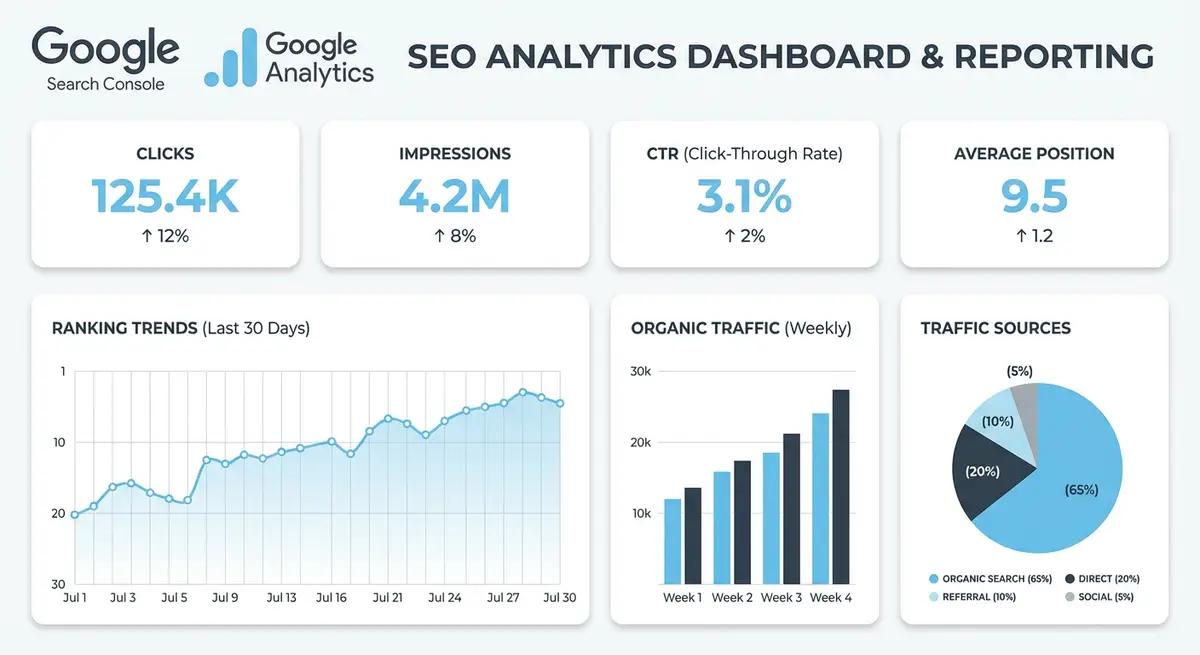
Step 9: Set Up Search Performance Monitoring
Once your website
is live, you need a way to understand how it performs in search.
Search
performance tools can help you discover whether your pages are being indexed
and how users find your website.
Monitor:
- - Search
impressions
- - Clicks
- - Search
queries
- - Average
positions
- - Pages
receiving organic traffic
This information
can help you identify opportunities.
For example,
suppose one of your articles begins appearing for a keyword but ranks around
the second page. You might improve the article by adding more useful
information, strengthening internal links, updating outdated sections, or
making the page easier to navigate.
Step 10: Build Authority Naturally
New websites usually need time to establish credibility. One way to strengthen your site's authority is to earn relevant backlinks. Create resources worth referencing.
For example, you
could publish:
- - Original
research
- - Industry
statistics
- - Detailed
tutorials
- - Useful
calculators
- - Comprehensive
guides
- - Original
case studies
- - Helpful
checklists
Then promote
those resources to people and websites that would genuinely find them useful.
Step 11: Keep Updating Your Content
SEO doesn't end
when you press the Publish button.
Search trends
change. Information becomes outdated. Competitors publish new content.
Review your most
important pages periodically.
Ask:
- - Is the
information still accurate?
- - Are the
links still working?
- - Can I add
better examples?
- - Is the title
still attractive?
- - Does the
page fully answer the searcher's question?
- - Are there
newer developments I should mention?
Updating valuable
content can help keep your website useful and competitive.
Step 12: Be Patient and Consistent
This may be the
most important lesson for anyone learning SEO.
A new website
usually won't become highly visible overnight.
SEO is a
long-term process.
Instead of
constantly changing strategies because you don't see immediate results, focus
on building a strong foundation.
- Publish useful
content consistently.
- Improve existing
pages.
- Fix technical
problems.
- Study your search
performance.
- Build genuine
relationships within your industry.
Over time, these
activities can create a much stronger website.
Final Thoughts
Learning how to do SEO for a new website is
much easier when you approach it step by step.
Start with your
audience and keyword research. Build a clear website structure, create
genuinely helpful content, optimize individual pages, improve mobile usability,
monitor search performance, and earn relevant links naturally.
Most importantly,
don't treat SEO as a one-time task.
Your competitors
are continually publishing and improving their websites, and search behavior
changes over time. The websites that consistently provide useful and up-to-date
information and deliver a good experience are better positioned for long-term
organic growth.
Start with the basics today, keep improving your website, and give your
SEO strategy enough time to work.









0 Comments